
Keeping network drawings up to date
Network drawings are one of those jobs that are easy to put off. Someone moves a connection, a switch gets replaced, and updating the drawing ends up on the list for another day. Before long, you’re not quite sure whether the drawing still matches what’s in the cabinet.
That uncertainty tends to become a nuisance just when you need the drawing most. You’re planning some maintenance, or trying to understand which equipment shares an uplink, and first you have to check whether the lines on the page still mean anything.
Start with the bits you need to trust
You don’t always need to redraw the whole network. Start with the part affected by the work. Check the device names and management addresses, then follow the important connections from both ends. Neighbour information from CDP or LLDP can help identify the switches and ports involved. Interface descriptions are useful too, though they can be just as out of date as the drawing.
It’s worth checking whether two apparent links are members of a port channel, and whether a connection carries the VLANs you expect. If a neighbour entry is missing, that doesn’t necessarily mean the cable has gone. Discovery may be disabled, or the account collecting the information may not have permission to read it.
Keep a note of anything you haven’t confirmed. A drawing with a few clearly marked questions is more useful than one that quietly presents every line as certain. Add the date and scope of the checks so the next person knows what they’re looking at.
Bringing the drawing and the evidence together
OPIA brings collected neighbour and interface information together in a topology view. For supported Cisco IOS and IOS-XE devices, running current fingerprint, inventory and topology activities gives it evidence to work from. You can inspect devices and links, arrange the drawing, save the layout and export a PDF for a review.
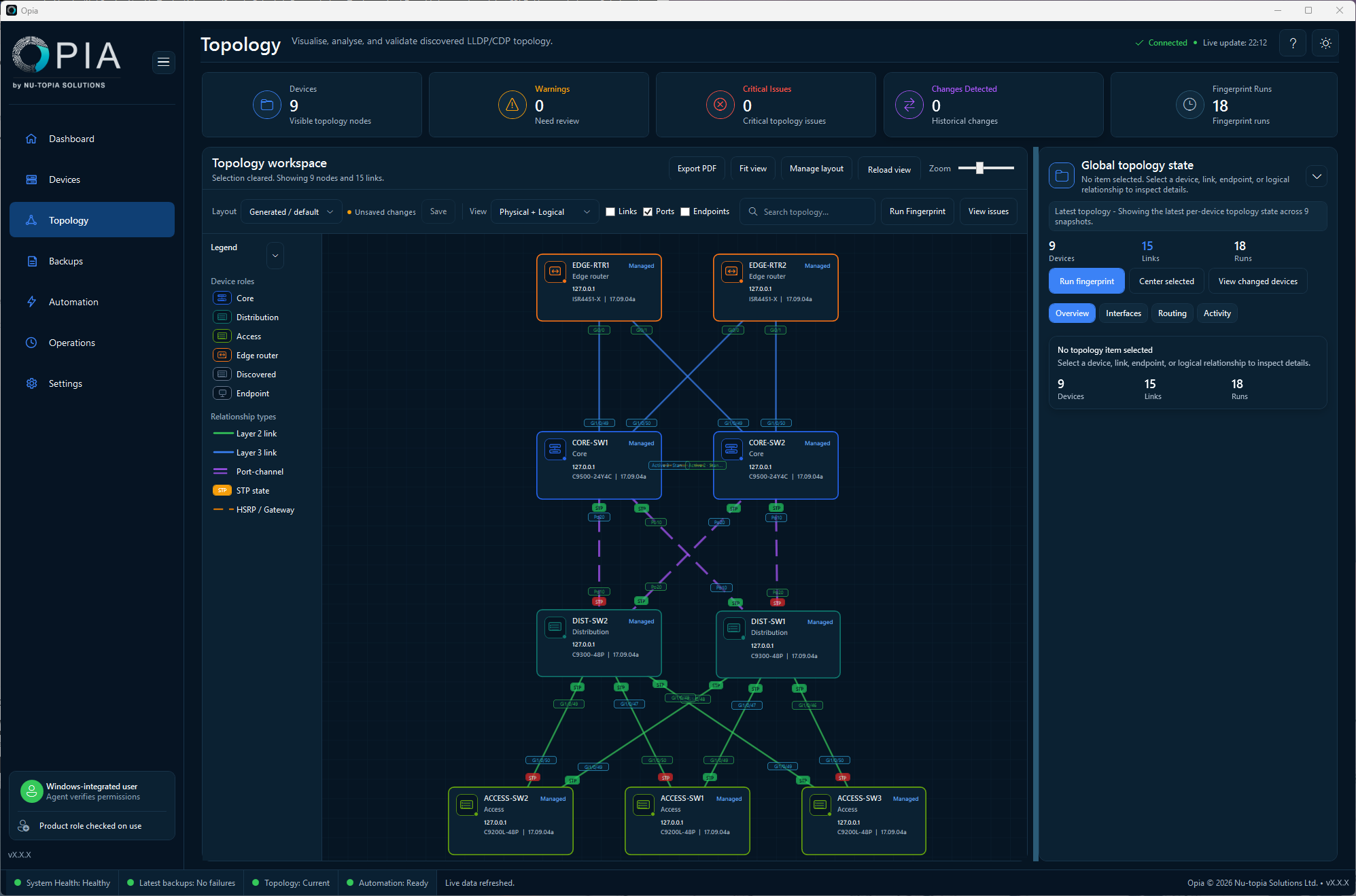
The distinction between observed and inferred connections matters here. A CDP or LLDP link is based on a neighbour observation. An inferred relationship is a correlation from other collected information, so it needs checking before you rely on it for a change. OPIA shows these differently and provides the available evidence.
The map is a snapshot of what was collected, rather than a live view of every cable. If a device hasn’t been collected, or a command failed, part of the picture may be missing. Refresh the relevant collections after changes and check the result before using it as the current drawing.
There’s still engineering judgement involved. The useful part is having the evidence and the drawing together, so you can see what needs another look.
There’s more on this in the OPIA topology documentation.